
Quick answer
A home service CRM is software that helps contractors manage customer information alongside service enquiries, communication, estimates, bookings, jobs, invoices, payments, follow-ups, and service history.
For a contractor, the CRM should connect the customer to the property, appointment, estimate, technician, job status, invoice, and future service opportunity.
The operating principle is simple: every active opportunity needs a known status, an owner, and a next action.
A homeowner calls an HVAC company because the air conditioner has stopped working. The owner is already on another job, the office is handling two customers, and the call reaches voicemail.
Two hours later, someone notices the missed call. By then, the homeowner has already booked another company.
At a roofing business, an estimator visits a property, prepares a detailed quote, and sends it to the customer. The customer opens it but does not respond. No follow-up task is created, so the estimate sits untouched until everyone forgets about it.
At a plumbing company, the office books a job but leaves the customer's photos and access instructions inside a text-message thread. The technician arrives without the full context and asks the customer to explain everything again.
These look like separate problems. They are usually symptoms of the same underlying failure: information entered the business, but no reliable workflow moved it forward.
A home service CRM should prevent that.
It should capture the enquiry, identify the next action, assign responsibility, retain the customer's information, move the opportunity toward a booked job, and show the owner where leads, estimates, appointments, and payments are getting stuck.
A CRM that only stores names and telephone numbers is an expensive address book. Its real value comes from the operating workflow built around the customer data.
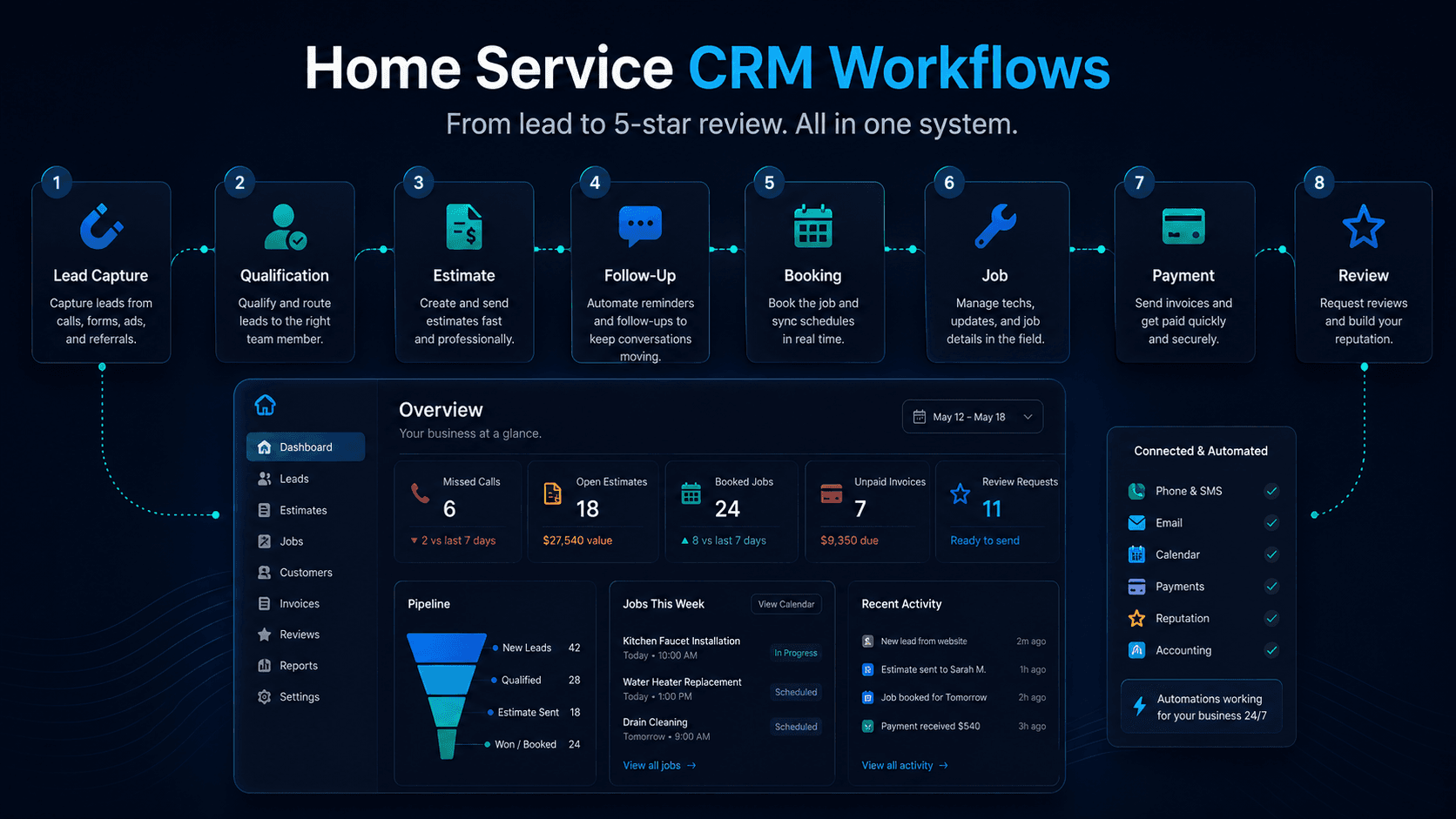
CRM stands for customer relationship management. Salesforce defines CRM as a system for managing interactions with current and potential customers, keeping teams connected to customer information and helping businesses streamline processes. For a home service company, that relationship has to remain connected to the property, appointment, estimate, technician, job status, invoice, and future service opportunities.
That creates a customer journey that looks something like this: enquiry to qualification to estimate or inspection to follow-up to booking to dispatch to job completion to payment to review or repeat service.
The precise stages will change by trade. An HVAC repair company will not qualify a lead in the same way as a roofing replacement contractor. The operating principle, however, remains the same: every active opportunity needs a known status, an owner, and a next action.
Why contractors need more than a customer database
Customers do not experience a home service company as a collection of separate departments and applications.
They do not care whether the receptionist recorded their address in one system, the estimator stored photos somewhere else, the dispatcher received notes through text, and the technician uses another application in the field.
They expect the company to know who they are, why they contacted it, what was promised, and what is supposed to happen next.
A functional CRM for home services gives each authorized employee the context required for their part of the work. The receptionist can see the enquiry. The estimator can see the customer's problem and uploaded photos. The dispatcher can see the appointment requirements. The technician can see the service history and approved scope. The office can see whether the invoice was paid.
The owner should be able to see all of this without calling five employees and rebuilding the story manually.
That is the difference between storing information and operating from it.
Home service CRM vs. a generic CRM
A generic CRM normally focuses on contacts, companies, sales opportunities, email activity, marketing campaigns, and customer-support cases. That structure can work well for office-based sales teams, agencies, consultants, and software companies.
A contractor CRM has to account for physical service delivery.
The contact is not always the property owner. The billing address may be different from the service address. One customer may manage several properties. One property may contain multiple systems or pieces of equipment. A single opportunity may require an inspection, estimate, permit, deposit, technician visit, return appointment, and final invoice.
A generic deal therefore becomes much more complicated inside a home service operation.
It may represent a blocked drain, a failed air-conditioning system, an electrical panel upgrade, storm damage, a solar installation, recurring cleaning, or a commercial maintenance contract. Each job type has different questions, timing, risks, personnel requirements, and completion rules.
A generic CRM can sometimes be configured to handle this. The question is not whether customization is technically possible. The real question is how much manual work, integration, maintenance, and employee discipline will be required to make it dependable.
Home service CRM vs. field service management software
CRM and field service management software started with different priorities.
CRM traditionally focused on the relationship and the sales process. It tracked where a lead came from, who contacted the company, what the customer needed, whether the opportunity was qualified, and whether an estimate had been accepted.
Field service management software focused on delivering the work. It handled scheduling, dispatch, technician assignments, work orders, routing, job statuses, field documentation, invoicing, and payments.
Those categories now overlap heavily. Modern home service management software often combines customer management, quoting, scheduling, dispatch, invoicing, communication, and reporting in the same platform. ServiceTitan, Housecall Pro, Jobber, Workiz, and Service Fusion all document different combinations of these capabilities in their current products.
The label matters less than the workflow.
A contractor should care whether the system can take a customer from first contact to completed and paid work without employees repeatedly copying information between tools.
Home service CRM vs. booking software
Booking software reserves a time. A service CRM retains the wider customer and job context.
A booking may show that someone has an appointment at 10:00 a.m. A connected CRM should also show what service they requested, the property address, the urgency, previous communication, uploaded photos, the approved estimate, access instructions, the assigned employee, the equipment history, and whether a deposit has been paid.
A full calendar can still be badly organized.
The wrong technician may be assigned. Too little time may be allocated. The property may be outside the normal service area. The required parts may be unavailable. The customer may expect work that was never approved.
A calendar is part of the operating system. It is not the operating system by itself.
How a home service CRM works from lead to completed job
The cleanest way to understand a home service CRM is to follow one opportunity through the business.
| Workflow stage | What the CRM should know | What must happen next | Typical revenue leak |
|---|---|---|---|
| New enquiry | Contact details, lead source, service need and time received | Acknowledge, assign and respond | The call or form is ignored |
| Qualification | Address, job type, urgency and service fit | Book, inspect, estimate, nurture or decline | Staff chase poor-fit leads |
| Estimate | Scope, value, delivery date and customer response | Follow up and resolve the decision | The quote is sent once and forgotten |
| Booking | Date, duration, crew, notes and approved scope | Confirm and prepare the visit | Double-booking or incomplete intake |
| Dispatch | Technician, route, priority and job context | Complete the correct work | Weak office-to-field handoff |
| Job completion | Work performed, notes, photos and required follow-up | Close, invoice or schedule a return | Completed work remains undocumented |
| Payment | Invoice, deposit, balance and status | Collect and reconcile payment | Finished jobs remain unpaid |
| Retention | Review status, service history and future need | Request feedback or create repeat work | The customer disappears after one job |
The CRM does not have to automate every decision. It does need to make the status and responsibility visible.
Stage 1: Capture every enquiry
Home service enquiries rarely arrive through one channel. Customers call, complete forms, send texts, use Google Business Profile, respond to advertisements, message social pages, use website chat, or contact the business after hours.
The first job of the CRM is to create one visible record regardless of where the request originated.
That record should identify the customer, contact method, service address, lead source, service request, time received, current owner, status, and next required action. The office should not have to search email, voicemail, Facebook, individual mobile phones, and several spreadsheets to determine who is waiting for a response.
Speed matters because many customers are contacting several businesses while trying to solve an immediate problem. Jobber's 2026 Home Service Trends Report found that more than 55% of surveyed customers expected a response within an hour, including 28% who expected an immediate response. The report was based on a December 2025 survey of 1,050 U.S. home service business owners and also incorporated aggregated Jobber platform data. Because the research was produced by a software vendor, it should be treated as directional industry evidence rather than a universal benchmark.
A CRM should also distinguish between an acknowledgement and a meaningful response.
An automatic message saying, "We received your request," does not mean the lead has been handled. It only prevents silence. Someone - or an approved AI intake workflow - still needs to understand the request, confirm the details, and establish the next step.
Stage 2: Qualify the lead before filling the calendar
Not every enquiry should become a technician appointment.
Qualification determines whether the business offers the requested service, whether the property is inside the service area, how urgent the situation is, what skills or equipment may be required, and whether the opportunity should become a booking, inspection, estimate, future follow-up, or polite decline.
The intake questions should reflect the trade.
A CRM for HVAC companies may need the equipment type, approximate system age, current symptoms, thermostat status, number of affected zones, and whether there is a safety concern.
A CRM for plumbing businesses may need to determine whether water is actively flowing, whether the supply can be shut off, whether sewage is involved, which fixtures are affected, and whether property damage is continuing.
A CRM for roofing companies may need the roof type, approximate age, number of storeys, visible interior damage, storm date, insurance involvement, and whether emergency protection is needed.
Qualification protects the calendar. Without it, a company can remain busy while sending technicians to the wrong jobs, outside its territory, without enough time or the correct information.
Stage 3: Give every opportunity a clear status
Once a lead is considered a potential fit, it should enter a visible pipeline.
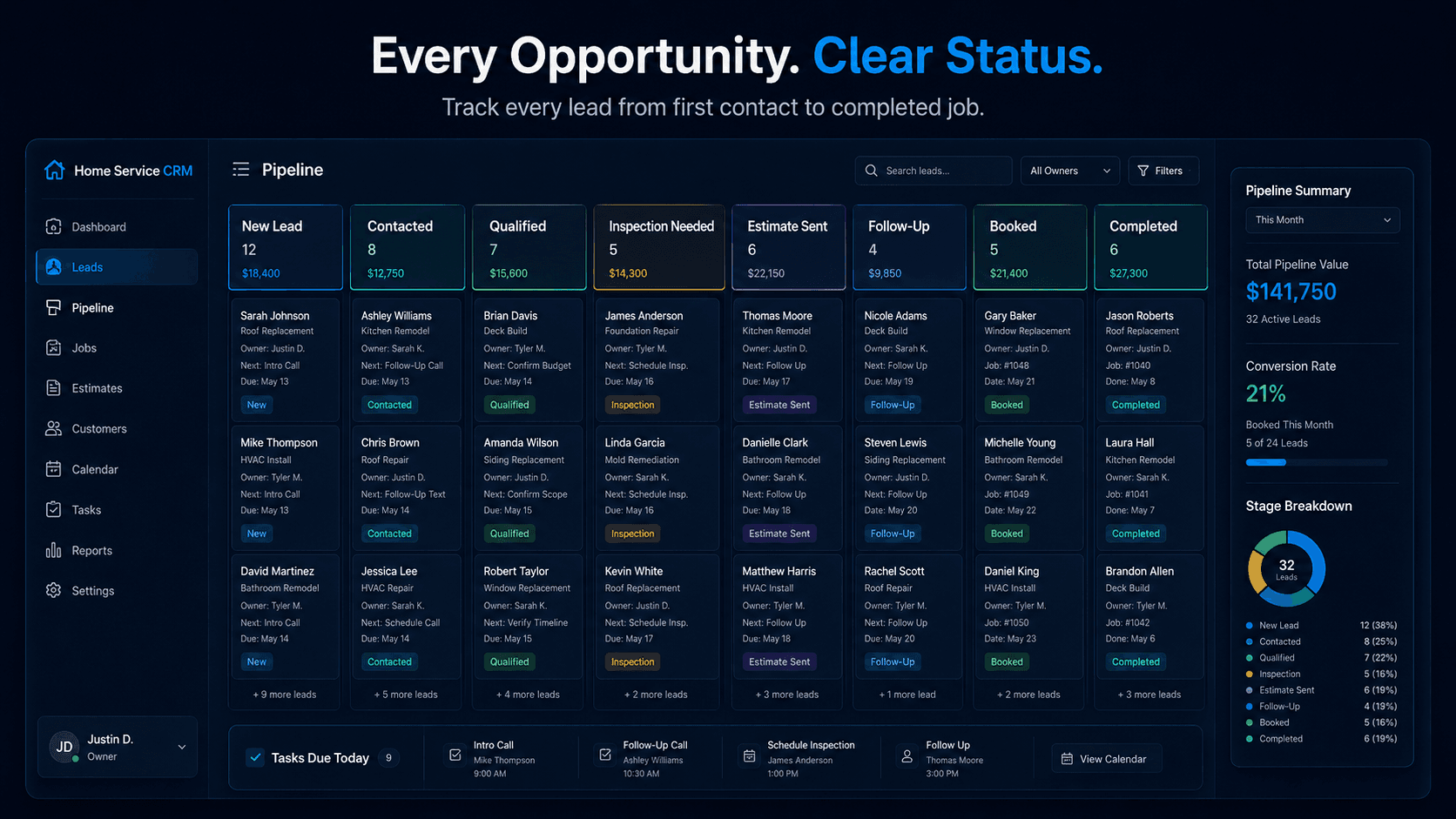
A practical contractor CRM might move opportunities through stages such as: New Lead to Contacted to Qualified to Inspection Needed to Estimate Sent to Follow-Up to Booked to Completed to Lost.
The exact labels are less important than the operating rules behind them.
Qualified must mean something specific. Follow-Up should not become a graveyard containing every old enquiry. Lost should include a reason, such as price, timing, service-area mismatch, competitor selected, unresponsive customer, or unsupported service.
Every open opportunity should have one current stage, one responsible person, one next action, and one due date.
When one of those is missing, the opportunity is no longer being managed. It is merely being stored.
Stage 4: Manage the estimate after it is sent
Many businesses treat the estimating process as finished when the document leaves the inbox.
That is where a large amount of work starts going cold.
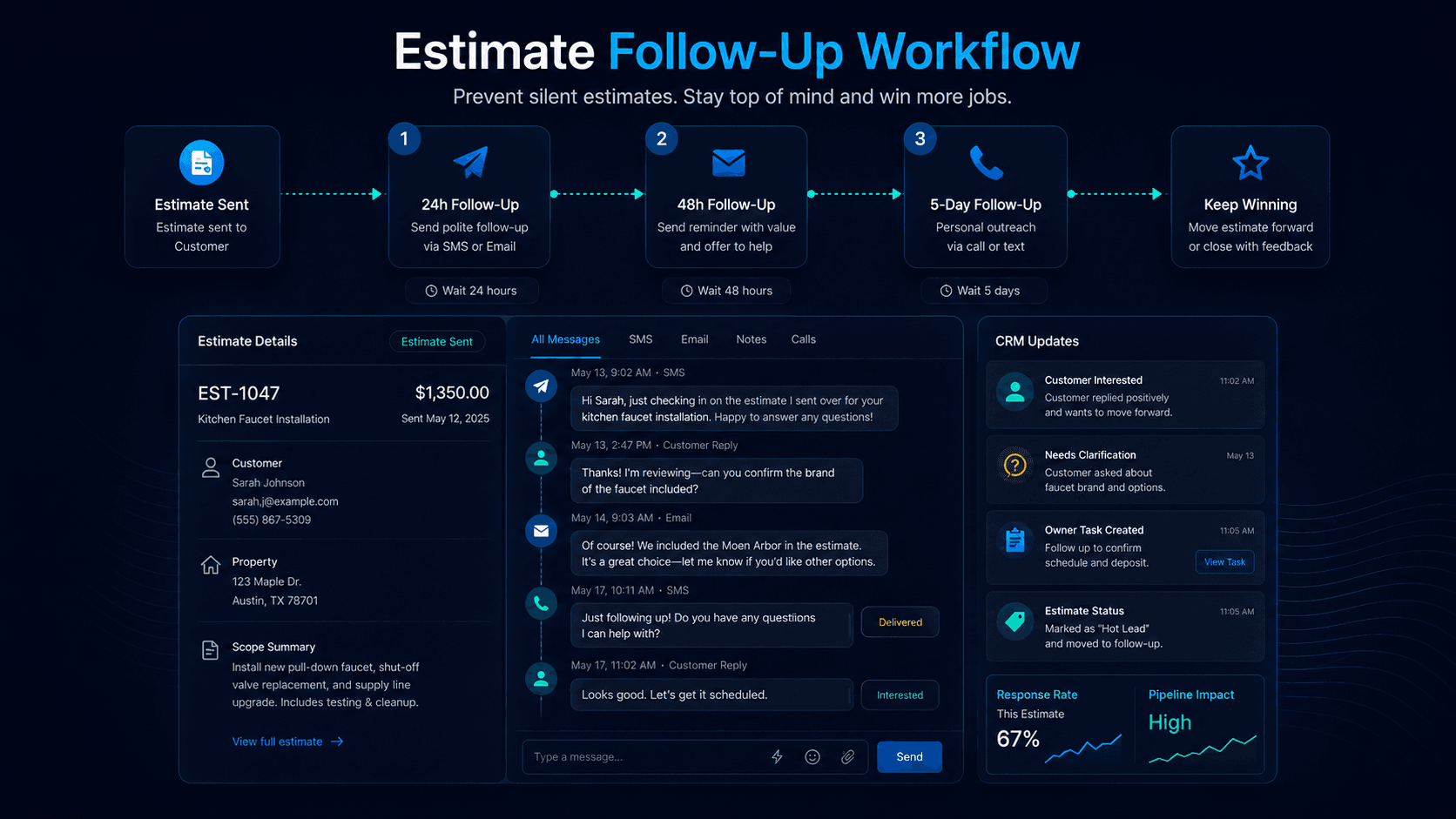
The CRM should record when the estimate was sent, what scope and options were included, whether a deposit is required, whether the customer has viewed or approved it, when the next follow-up should occur, and what objection or uncertainty is preventing a decision.
A useful follow-up process does not spam the customer with the same message five times. It changes according to the situation.
The first contact might confirm that the quote was received. The next might ask whether the customer needs clarification. A later conversation might uncover a concern about timing, financing, price, scope, insurance, or comparison with another contractor.
The automation should stop when the customer responds, approves, declines, requests a later decision date, or opts out.
Large replacements, commercial bids, insurance-related work, and sensitive customer situations often require a personal call. Automation should protect consistency, not remove judgment.
RIKU Growth's guide on why estimates go cold after the first conversation goes deeper on quote ghosting, and the estimate follow-up workflow page explains how follow-up stages can be structured.
Stage 5: Convert the approved opportunity into an operational job
When the customer agrees to move forward, the CRM should carry the approved information into the booking instead of forcing the office to rebuild it.
The job record should contain the service address, appointment window, expected duration, assigned technician or crew, approved scope, customer notes, access instructions, equipment or property details, required materials, and payment status.
This is where many businesses discover that sales and operations are not actually connected.
The estimator may understand the work, but the dispatcher receives a vague note. The dispatcher may understand the priority, but the technician only receives an address. The customer then becomes the person responsible for repairing the company's internal communication.
A connected contractor CRM prevents that by keeping the context attached to the job as it moves between people.
Stage 6: Confirm, dispatch, and keep the customer informed
Scheduling is not only about finding an empty space.
The office needs to consider technician skill, travel time, service area, expected job duration, urgency, parts availability, existing commitments, and whether the customer has confirmed.
Once the visit is scheduled, communication should be triggered by real events. Booking confirmations, reminders, delay notices, technician-assigned messages, and "on my way" updates reduce uncertainty without forcing the customer to call the office for basic information.
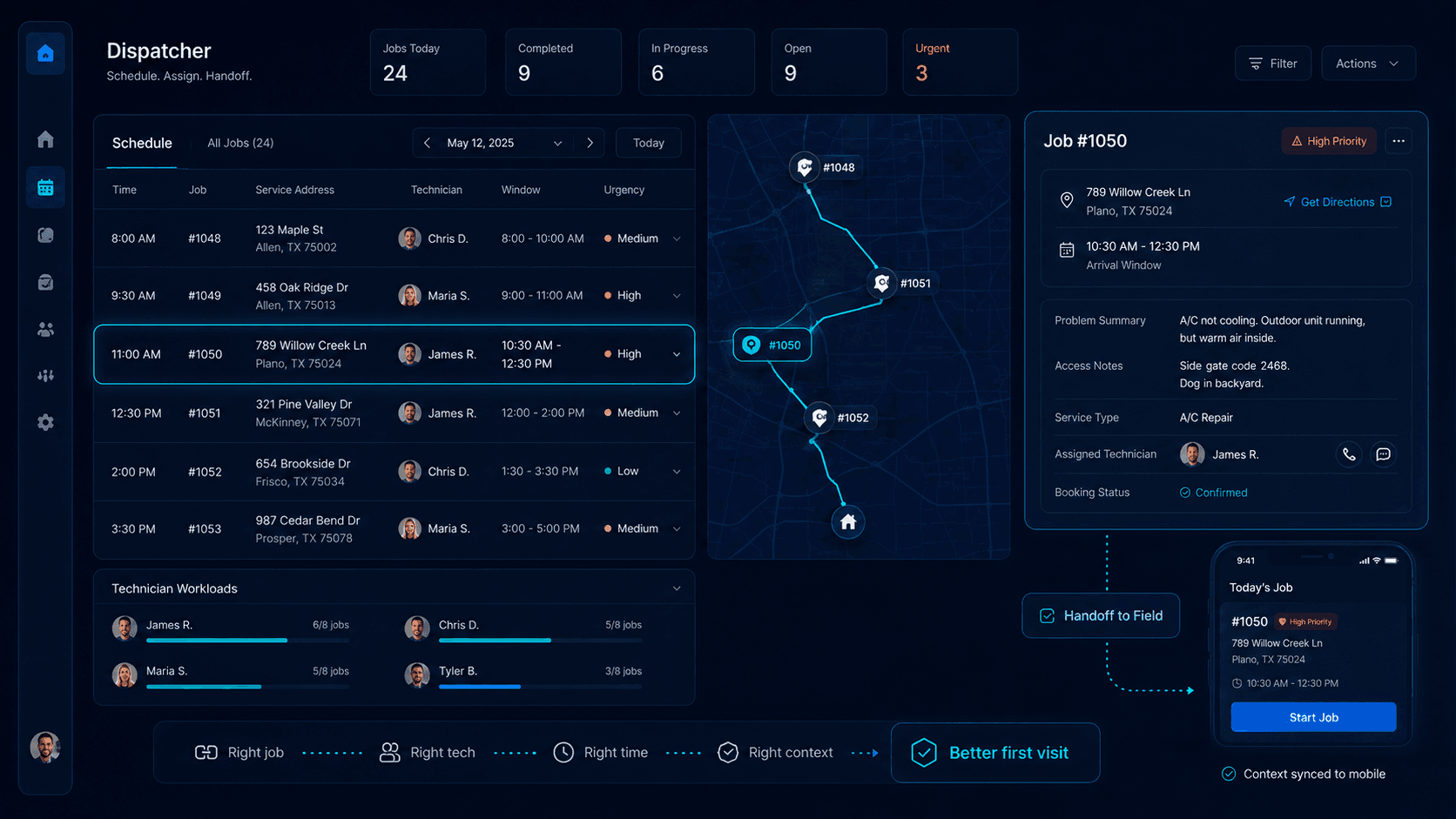
The technician should receive the same context the office already has. That may include previous service records, uploaded photos, approved estimates, access details, customer concerns, and equipment information. A dispatcher assist workflow can help turn those details into a clearer office-to-field handoff.
This handoff matters because field employees already lose substantial time to administrative work. Salesforce's seventh State of Service report found that surveyed mobile workers estimated that 18% of their working hours - more than seven hours during a standard week - were wasted on administration such as completing forms and searching for information. The research covered a broad field-service population rather than home service contractors alone, but it illustrates the cost of weak information flow.
Stage 7: Close the job properly
A technician finishing the physical work does not necessarily mean the job has been operationally completed.
The office may still need the final notes, customer signature, before-and-after photos, materials used, equipment changes, recommendations, warranty details, return-visit requirements, invoice information, and customer approval.
When jobs are closed inconsistently, reporting becomes worthless.
Completed work remains marked in progress. Return visits are buried in notes. Additional recommendations disappear. The owner's dashboard no longer reflects reality, so employees stop trusting it.
A good field service CRM should make completion easy enough that technicians actually use it. The workflow has to capture necessary information without turning every visit into a long administrative exercise. RIKU Growth's post-job report automation service is built around that same handoff problem.
Stage 8: Connect completion to invoicing and payment
The job should not disappear from operational visibility after the technician leaves.
The CRM or connected billing system should show whether the invoice has been created, sent, viewed, paid, partially paid, overdue, disputed, or assigned for follow-up.
This is particularly important for companies that collect deposits, offer financing, use progress billing, or handle work requiring several visits.
The owner should be able to identify completed but uninvoiced jobs and overdue balances without manually comparing the calendar, field notes, accounting system, and bank deposits.
Revenue is not complete when the work is finished. It is complete when the work is documented, invoiced, collected, and reconciled.
Stage 9: Turn completed work into reviews and repeat business
The relationship does not have to end after payment.
The customer record can support a satisfaction check, review request, warranty follow-up, maintenance reminder, membership renewal, seasonal campaign, equipment replacement reminder, or future recommendation.
Reviews deserve particular attention because local customers use them to reduce risk.
BrightLocal's 2026 Local Consumer Review Survey found that 97% of its representative panel of 1,002 U.S. adults read reviews for local businesses. It also found that 78% had been asked to leave a review during the previous year, and 65% of those asked went on to write one.
Google's Business Profile guidance explains how businesses can share a direct review-request link or QR code with customers. The sensible workflow is to ask for honest feedback at an appropriate point, not to manufacture praise or pressure selected customers into leaving explicitly positive reviews.
A review request should also respect customer context. If the job is still disputed, delayed, incomplete, or awaiting a callback, the priority should be internal resolution - not pushing the customer toward a public review page.
What problems does a home service CRM solve?
A home service CRM does not solve every business problem. It addresses a specific class of failures: work that is lost because information, responsibility, or the next action is unclear.
Missed and untracked enquiries
Calls, forms, texts, chats, and advertising leads should enter a visible queue. The team should be able to see what is new, what has been acknowledged, who owns it, whether contact was made, and what happens next.
Without that structure, an enquiry can disappear while every employee assumes someone else handled it.
Slow lead response
A CRM can acknowledge the request, assign it, trigger an alert, create a task, and escalate it when the expected response does not happen.
The system does not remove the need for a useful conversation. It prevents the request from ageing silently.
Forgotten estimate follow-up
An estimate should remain active until the customer approves, declines, requests a later decision date, or reaches the company's defined lost-opportunity threshold.
No reply is a status requiring a decision. It should not be the default ending.
Scheduling and dispatch confusion
A shared operational record reduces double-booking, undocumented changes, vague assignments, and technicians arriving without the necessary information.
Incomplete customer history
The company should be able to see previous work, equipment details, estimates, photos, communication, complaints, warranty information, payments, and outstanding recommendations without rebuilding the history from memory.
Poor owner visibility
The owner should not have to ask, "What happened to that lead?" repeatedly.
The CRM should answer the question.
Essential features of a home service CRM
The best feature list is not the longest one. It is the one that supports the company's real workflow without creating unnecessary administrative work.
Unified lead capture
The platform should receive or synchronize the channels the company actually uses. A claimed library of hundreds of integrations means very little if the website form, phone provider, advertising source, calendar, or accounting system the business depends on does not transfer the required data reliably.
Customer, property, and equipment records
A service CRM should distinguish the person from the property and the property from the equipment.
One landlord may manage ten addresses. One commercial customer may have several locations. One home may contain multiple HVAC systems, panels, appliances, or service plans.
Trying to force all of that information into one basic contact field creates duplicate records and unreliable reporting.
Intake and qualification
The system should collect the information needed to make the next operational decision. That does not mean forcing every caller through a twenty-question interrogation. It means capturing enough information to determine fit, urgency, scope, and the correct next step.
Pipeline and task management
A pipeline should reveal where opportunities are moving and where they are stuck. Task rules should create accountability without covering the team in unnecessary reminders.
The system should help employees determine what needs action today, not simply show everything that has ever entered the database.
Scheduling, dispatch, and mobile access
The office needs visibility into availability, technician skills, job duration, geography, priority, and confirmation status. Field employees need a mobile view that gives them job context and lets them return notes, photos, statuses, and recommendations without fighting the software.
Estimates, invoices, and payment status
The estimate should remain connected to the customer, approved scope, booked work, completed work, invoice, and final payment. Disconnecting those records makes it difficult to understand what was sold, what was delivered, and what remains unpaid.
Communication and automation
Useful automation can support missed-call recovery, enquiry acknowledgements, estimate follow-up, appointment reminders, arrival updates, payment reminders, review requests, and future service reminders.
Automation becomes harmful when it ignores customer replies, keeps sending after a status change, or attempts to handle exceptions that require human judgment.
Reporting and owner visibility
The dashboard should help the owner decide where intervention is required.
It should show response delays, unassigned leads, stale estimates, unconfirmed appointments, jobs missing information, completed but uninvoiced work, overdue balances, unresolved complaints, and customers due for follow-up.
A dashboard full of attractive charts that do not change a decision is decoration. The revenue leakage calculator can help owners estimate where these operational gaps may be showing up.
Permissions and data security
A CRM can contain names, telephone numbers, addresses, property details, payment information, access notes, recordings, and private customer communication.
Access should reflect the employee's role. A technician may need the day's job information but not every customer record or financial report. A marketing contractor may need lead-source totals but not payment data.
The Federal Trade Commission's personal-information guidance recommends that businesses identify what personal information they hold, keep only what they need, protect retained information, dispose of unnecessary data properly, and prepare for security incidents.
What are the four types of CRM?
The four commonly discussed CRM categories are operational, analytical, collaborative, and strategic CRM. Some frameworks combine or rename these categories, but the four-part model is useful for understanding what a contractor CRM is expected to do.
Operational CRM
Operational CRM manages customer-facing processes such as enquiry capture, qualification, estimating, booking, reminders, invoicing, and follow-up.
This is the part most employees interact with every day.
Analytical CRM
Analytical CRM turns customer and operational data into information the owner can use. It may reveal which lead sources produce booked revenue, which services convert best, how long estimates remain open, or where appointments and payments are being delayed.
Collaborative CRM
Collaborative CRM allows receptionists, office managers, estimators, dispatchers, technicians, finance staff, and owners to work from the same customer context.
Its purpose is to stop information from becoming trapped inside individual inboxes, phones, or memories.
Strategic CRM
Strategic CRM uses customer history to support longer relationships. Maintenance plans, seasonal reminders, equipment-lifecycle communication, reactivation campaigns, and customer segmentation fall into this category.
A modern home service CRM may contain elements of all four rather than belonging to only one.
What is a service CRM?
A service CRM is a customer relationship management system designed around delivering services rather than selling products alone.
It connects the customer to the request, appointment, employee, work performed, communication, billing, and service history.
A home service CRM is a more specific version of a service CRM. It is built around work performed at residential or commercial properties and therefore needs stronger support for locations, scheduling, dispatch, technicians, estimates, equipment, and field documentation.
What is an in-house CRM system?
The phrase in-house CRM system is used in two different ways.
It may refer to a CRM hosted and operated on the company's own infrastructure. It may also refer to a custom CRM developed specifically for one company's internal processes.
A custom system can match unusual workflows, permissions, dashboards, and integrations more closely than an off-the-shelf platform. That control is valuable when a company has genuinely distinctive operational requirements.
It also creates responsibility.
The business now has to account for development, testing, authentication, data security, backups, mobile usability, reporting, messaging infrastructure, integration changes, bug fixes, user support, and future product development.
Building a custom CRM because existing subscriptions feel expensive is usually weak reasoning. The comparison is dishonest when it measures a software subscription against only the initial coding cost and ignores years of maintenance.
An in-house CRM system makes more sense when the company has documented processes that established platforms cannot support without serious operational compromise.
Does every home service business need the same CRM?
A solo contractor may only need customer records, simple scheduling, quotes, invoices, payment collection, and reminders. Giving that person an enterprise implementation with dozens of permissions and workflow branches would create more work than value.
A growing team has different needs. Once several people are handling enquiries, estimates, scheduling, and field work, shared ownership and clear handoffs become critical.
A multi-truck operation may require dispatch controls, skill-based assignments, service agreements, job costing, call tracking, inventory, capacity planning, and deeper reporting.
A multi-location or franchise operation may also need territory rules, standardized processes, local permissions, consolidated reporting, and stronger integration governance.
The best CRM for home service businesses is therefore not one universal product. It is the system that matches the company's present complexity without blocking the next stage of growth.
What should the owner dashboard show?
A useful owner dashboard should behave like an exception report.
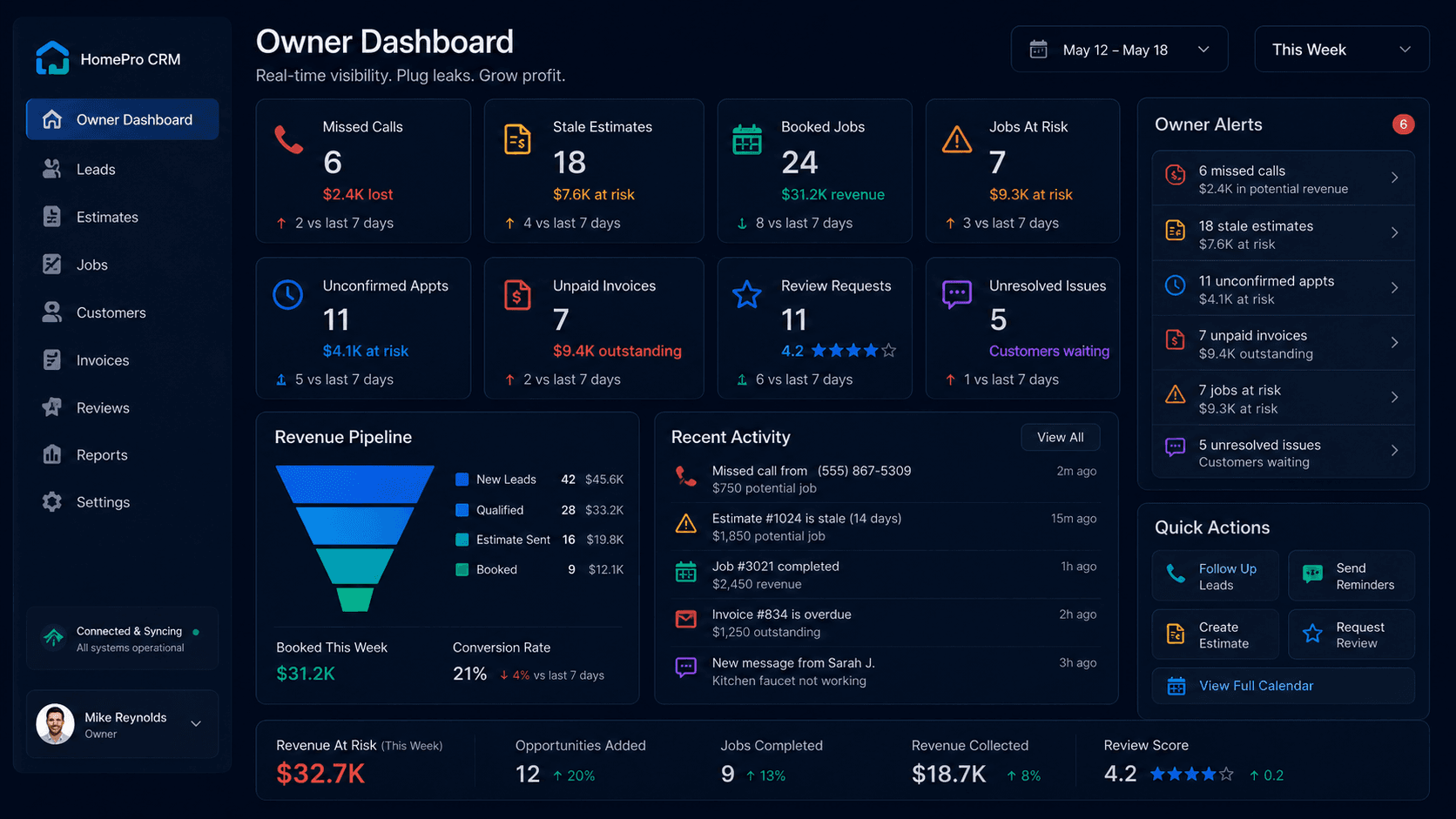
Instead of displaying every piece of data, it should surface the work that is at risk.
The owner should be able to see new enquiries awaiting contact, leads without an assigned owner, qualified opportunities without a next action, estimates that have become stale, appointments that remain unconfirmed, jobs missing documentation, completed work waiting for invoices, and overdue customer balances.
It should also answer commercial questions. Which lead sources generate completed revenue rather than raw enquiry volume? What percentage of qualified leads become booked jobs? Which lost reasons occur repeatedly? How quickly does the company respond? Which services produce repeat work?
The dashboard becomes valuable when it changes what the owner or team does next.
Benefits of a properly configured contractor CRM
A well-designed contractor CRM can produce faster lead handling, more consistent follow-up, cleaner scheduling, better field handoffs, stronger job documentation, faster invoicing, clearer accountability, and more reliable reporting.
Those outcomes do not appear merely because the company purchased software.
The business still has to define what information must be captured, what each pipeline stage means, who owns the next action, when automation should run, when a human should intervene, and how completed work is closed.
Software cannot fix a process nobody has defined.
Common home service CRM implementation mistakes
Buying software before mapping the workflow
This is the most common failure.
The company watches a polished demonstration, becomes excited about features, and purchases the platform before documenting how an enquiry currently moves from first contact to payment.
The result is a new tool wrapped around the old confusion.
Creating too many pipeline stages
A pipeline with twenty-five stages may look sophisticated but quickly becomes unusable. Employees interpret the stages differently, records remain stuck, and reporting becomes unreliable.
Stages should represent meaningful changes in customer or operational status - not every small administrative action.
Automating a bad process
Automation creates consistency. If the underlying process is poor, the company simply performs the wrong action more consistently and at greater speed.
Leaving ownership vague
Someone in the office will handle it is not an assignment.
Every open lead, estimate, job issue, unpaid invoice, and customer complaint needs a responsible person and a defined escalation rule.
Ignoring field usability
A field service CRM fails when technicians avoid it.
If updating a job requires too much typing, too many screens, poor connectivity, or duplicate data entry, employees will return to private notes and text messages.
Importing dirty data
Duplicate contacts, inconsistent addresses, missing fields, dead leads, and outdated permissions do not become useful because they were moved into a newer platform.
Migration should include cleanup, not just copying.
Measuring activity instead of outcomes
The number of messages sent or tasks created means little unless the company knows whether customers were reached, estimates were approved, jobs were booked, invoices were paid, and repeat work was created.
How to choose a CRM for a home service business
Start with the workflow, not the vendor list.
Document how an enquiry currently enters the company, who responds, what information is collected, how estimates are created, how appointments are booked, how technicians receive notes, how jobs are closed, and how invoices and follow-ups are handled.
Then identify the largest point of leakage.
For one company, it may be missed calls. For another, it may be slow estimates, weak qualification, poor dispatch handoffs, incomplete technician notes, or unpaid invoices. RIKU Growth's guide on why home-service companies lose leads explains how these leaks often appear across the whole workflow.
The most expensive platform will not automatically solve the most important problem.
During product demonstrations, use real operating scenarios rather than accepting a generic tour. Ask the vendor to show an after-hours emergency enquiry, a lead outside the service area, a customer with several properties, an estimate requiring several options, a rescheduled appointment, a technician requesting additional approval, a return visit, and an unpaid completed job.
Test the mobile experience with the people who will actually use it.
Finally, calculate the full cost. That includes subscriptions, per-user fees, setup, migration, training, phone and messaging usage, AI usage, payment fees, third-party integrations, custom development, support, contract commitments, and data-export limitations.
A cheap subscription that requires constant manual work is not cheap. An expensive platform filled with unused features is not sophisticated. It is waste.
What are the top five CRMs for home service businesses?
There is no defensible universal ranking, because the correct platform depends on trade, size, workflow, call volume, reporting requirements, budget, and integrations.
Five commonly evaluated options are:
| Platform | Generally worth evaluating when... |
|---|---|
| Jobber | The company wants a relatively straightforward connection between customer management, quoting, scheduling, invoicing, mobile work, and customer communication. |
| Housecall Pro | A small or growing home service team wants integrated scheduling, dispatch, estimates, invoicing, payments, and job management. |
| ServiceTitan | A larger or more operationally complex contractor needs deeper call booking, dispatch, capacity, reporting, and management controls. |
| Workiz | The company prioritizes scheduling, dispatch, job tracking, customer communication, invoicing, and technician mobile access. |
| Service Fusion | The business wants core scheduling, dispatch, estimating, customer management, invoicing, payments, and mobile field tools. |
These descriptions are based on the vendors' current official feature documentation, not an independent hands-on ranking. Product capabilities, packaging, and pricing can change, so every critical workflow should be verified during a current demonstration.
GoHighLevel and HubSpot are also relevant in some contractor technology stacks, particularly around marketing, lead nurturing, communication, and sales pipelines. They should not automatically be treated as complete substitutes for field-service operations. The right answer depends on what other systems remain in the stack.
Where AI fits into a home service CRM
AI can strengthen several stages of the workflow when it is connected to clear rules and approved information.
An AI receptionist can answer routine questions, identify the requested service, collect contact details, check the service area, ask trade-specific intake questions, identify urgency, request an appointment preference, and create a structured CRM record.
AI can also summarize calls, extract customer concerns, draft follow-up messages, prepare technician briefings, identify stale opportunities, and provide the owner with a daily summary of leads or jobs requiring attention. The CRM automation service page shows where this workflow layer can sit around existing tools.
The dangerous version is an AI system that improvises beyond its approved knowledge, quotes unsupported prices, misclassifies emergencies, or communicates without respecting consent and escalation rules.
Human involvement should remain available for safety risks, angry customers, pricing disputes, unusual jobs, commercial complexity, insurance disagreements, vulnerable customers, and situations the system cannot classify confidently.
Businesses using automated calling or AI-generated voices in the United States also need to review the rules that apply to their use case. The FCC has confirmed that TCPA restrictions covering artificial or prerecorded voices include AI-generated voices.
AI should reduce repetitive work and improve handoffs. It should not become an excuse to remove judgment from situations where judgment matters.
Home service CRM implementation checklist
This is one section where a checklist is genuinely useful:
- Map the current enquiry-to-payment workflow before configuring the system.
- Define the minimum customer, property, job, and equipment fields.
- Clean duplicate and outdated data before importing it.
- Define each pipeline stage and the rule for entering or leaving it.
- Assign ownership for leads, estimates, job issues, and payment follow-up.
- Configure communication templates and automatic stopping conditions.
- Connect forms, telephone systems, calendars, accounting, and payment tools.
- Set role-based permissions before inviting the full team.
- Test normal scenarios, edge cases, and integration failures.
- Train office and field employees using real workflows.
- Review open leads, stale estimates, and incomplete jobs after launch.
- Reassess the system after 30, 60, and 90 days.
Final takeaway
A home service CRM should operate as the control layer between marketing, customer communication, estimating, booking, field delivery, billing, and retention.
Its purpose is not merely to store customer information.
It should ensure that every enquiry is visible, every active opportunity has an owner, every next action is clear, every booked job carries the required context, every completed job reaches invoicing, and every owner can see where work and revenue are getting stuck.
Buying more software without fixing the workflow usually creates a more expensive version of the existing mess.
RIKU Growth helps home service contractors examine how calls, website enquiries, estimates, bookings, customer updates, field handoffs, and post-job tasks move through the business. The objective is to identify the operational leak first, then design the right combination of CRM structure, automation, communication, and reporting around it.
Find the CRM leaks before they become lost jobs.
Book a Workflow Audit to identify where leads, estimates, bookings, customer records, and follow-ups are currently getting stuck.
Sources and further reading
- Salesforce: What is CRM?
- Jobber: 2026 Home Service Trends Report
- Salesforce: State of Service, Seventh Edition
- BrightLocal: Local Consumer Review Survey 2026
- Google Business Profile review guidance
- Google review-link instructions
- FTC: Protecting Personal Information: A Guide for Business
- FCC: TCPA applies to AI technologies that generate human voices